29/08/26 15:06
After having my site back up for about two days, things were running smoothly - or so I thought. I decided to enable logging, and discovered the bad actors were clawing at the walls already. So, I decided to sort out my security, and then let the AI scrapers hammer my site anyway.
First, logging in Caddy. Like all things I've ever done with Caddy, this is pretty easy. My current config looks like so:
ryankrage77.me {
	# Set this path to your site's directory.
	root * /srv/www/ryankrage77.me

	# Enable the static file server.
	file_server
	try_files {path}.html
	encode zstd gzip

	#custom headers for matrix /.well-known/
	@matrixServer path /.well-known/matrix/server
	header @matrixServer Content-Type "application/json"

	@matrixClient path /.well-known/matrix/client
	header @matrixClient Content-Type "application/json"
	header @matrixClient Access-Control-Allow-Origin "*"

	#LOG!
	log {
		output file /var/log/caddy/access.log {
			mode 0644
			roll_at 00:00
			roll_size 100MiB
			roll_keep 14
			roll_keep_for 336h
		}
	}

	#NO LOG
	log_skip /.well-known/*
	@local `remote_ip('192.168.1.0/24')`
	log_skip @local
}
EDIT: Turns out this is a bad way to log - see this post for a proper logging + monitoring setup.
The #LOG! section there tells caddy what kind of log to write and where - in this case JSON to acess.log - and how to rotate them. I've still got an issue where it creates the log file and then can't write to it and crashes, hence my effort with 0644, but I've been awake for about 36 hours so that's a problem for when the logs rotate tonight and crash my site.
EDIT: I think this either a config error on my side, or a genuine bug in Caddy. log files somehow get created as root if they don't exist when Caddy restarts, despite Caddy not having permissions to do that, and no logrotate intefering. But it is able to subsequently do log rotations without issue. My workaround is to manually create the log files and set their permissions before restarting Caddy.
EDIT 2: Turns out it - sort of - is a bug. Running sudo caddy validate is what creates the log files as root. Relevant Github issue. I'll call this a bug because why is my config validater creating log files?!.
Then the #NO LOG section tells it to not log anything for .well-known and anything on my LAN, which would pollute the stats (.well-known sees a fair bit of traffic from Matrix federation, and aside from bots I visit my own site way more than anyone else).
With changes to logging you have to restart rather than reload Caddy, but it's equally fast either way. And once I got my logs, I found to my dismay that script kiddies were spamming me with requests for wp-content and x.php, while AI scrapers hoovered up all the content on the site in about five seconds flat, repeatedly.
Honestly I'm kind of insulted the scrapers are so slow. I bet I could serve all the (real) content on my site in well under five seconds, the bottleneck is on their end. A static site served with Caddy is plenty fast as we'll see soon. Well, except for that one 600MB image. But the scrapers clearly aren't going slow out of the goodness of their hearts, so they must just be that inefficient.
Before battening the hatches, I decided to do a little analysis on the logs to see who was doing what. I set up a cron job with goaccess, to make a static html dashboard of the stats every minute. Some bad actors include mj12bot.com, who were repeatedly scraping my MEC wiki every hour. Claudebot was eagerly checking my robots.txt and looking for a sitemap.xml every ten minutes - but in fairness, it was respecting robots.txt and staying off the rest of the site. And OpenAI have made about dozen different users agents, and they follow robots.txt very religously. I'd disallowed gptbot, but apparently that doesn't count against gptbot/1.4, who was happily poking around. Like a caricture disguise with the glasses with the big nose and mustache attached. Totally a different bot that I'd invited to train on my work.
I figured before getting started on the AI bots, I should actually secure things a bit. I enabled ufw, with the following ruleset:
     To                         Action      From
     --                         ------      ----
[ 1] 80/tcp                     ALLOW IN    Anywhere
[ 2] 443/tcp                    ALLOW IN    Anywhere
[ 3] 22/tcp                     ALLOW IN    192.168.1.0/24
[ 4] 80/tcp (v6)                ALLOW IN    Anywhere (v6)
[ 5] 443/tcp (v6)               ALLOW IN    Anywhere (v6)
That's only ports 80 and 443 open, which Caddy handles, and SSH only allowed inside the LAN (which sits behind a router and its own firewall anyway).
Next on my list was the script kiddies racking up 404's in my logs by looking for every wordpress, PHP and XSS vulnerability they could think of. None of which my static site has. For a while I tinkered with regex'ing the logs for these endpoints, but it would be a tedious cat-and-mouse game. I realised it would a lot easier to just block anyone who racks up too many 404 errors in a short time, since the bots don't bother going slow. I settled on this config with fail2ban:
~$ cat /etc/fail2ban/filter.d/caddy-bot.conf
[Definition]
failregex = ^\{.*"remote_ip":"".*"status":404.*\}$
ignoreregex =

~$ cat /etc/fail2ban/jail.local
[caddy-bot]
enabled  = true
filter   = caddy-bot
logpath  = /var/log/caddy/access.log
maxretry = 5
findtime = 30
bantime  = 1h
action   = nftables-multiport
So if you hit 5 404 errors in a 30 second window, your IP gets banned. Admittedly this is a pretty strict limit, but the ban is only for one hour, so if there's false positives it's not the end of the world. That also helps if the bots are running on residential proxies or behind NAT, and innocent users get caught in the crossfire. It's been working pretty well and pretty reliably stops those bots in their tracks. They do come back after the ban expires, but they just fall for it again.
So now I could finally turn my attention to the AI scrapers. Who'd scraped my site multiple more times while I was sorting the other stuff out. I considered just blocking the known user agents, either with fail2ban or in Caddy itself, but decided against it. For one, it would be another cat-and-mouse game that requires staying on top of the user agents they're using - OpenAI had already gone against the spirit of robots.txt while technically adhering to it. Secondly, there are some less reputable scrapers that just spoof their user agent. And lastly, I'd always wanted to run an AI tarpit.
An AI tarpit generates web pages on demand deterministically. They look vaguely plausible, but are full of gibberish text and code. They're full of links that go to more generated pages. And the pages are served directly from memory, they don't take up and space on disk, or hit your disk I/O. So it forms an endless maze of slop, that the AI scrapers can hoover up their hearts content. And since it's lightweight static content, it doesn't really cost me anything - I haven't noticed any increase in CPU or RAM usage, despite the bots sucking back over 40,000 pages an hour. In theory this polluted data can mess up training new models, but I'm pretty sure any AI company worth their salt is filtering it out after they've scraped it, and it's a tiny drop in the ocean of data anyway. Hosting an AI tarpit is more an act of protest, and a way of gathering data on the bots.
I briefly considered rolling my own tarpit. My idea is based off the library of babel - a number in one base is data in another base, and you can convert data into it's own index to deterministically generate it - but I love turnkey solutions so I went with Pyison. There's more security-focused tarpits like Iocaine that help you block bots, but Pyison just serves an endless maze of gibberish, which is what I wanted. I might look at creating my own tarpit in the future when I'm less tired.
I followed the instructions in the readme to spin it up in docker - notably, if you're reverse proxying it, you can't just download the container. You need to git clone it and edit the compose file, to set the port and the document root. You should also change the seed so your instance isn't serving the same text as others. There's actually quite a lot of control over the content you feed the bots, changing the text and images, etc, but I left it all on default.
Once it was up, I reverse-proxied it with Caddy like so:
#tarpit
handle /articles {
	reverse_proxy 127.0.0.1:8181
}

handle /articles/* {
	reverse_proxy 127.0.0.1:8181
}
Then, I created a fake sitemap.xml with a few thousand links of this directory (you're welcome claudebot!), and added a few links to it in the anti-AI web badges on the homepage. I also changed robots.txt to just invite everyone in. I sat back and waited.
Wow, it did not take long. Within an hour multiple gptbots were happily exploring the tarpit, making multiple requests per second. The logs were hypnotic to watch.

So far, traffic has peaked at about 40,000 pages an hour, or a little over 10 requests a second. Pyison has generated no detectable CPU or memory load, and the rest of the stack didn't notice anything either. I literally could not tell from my system monitoring that anything was different from idle.
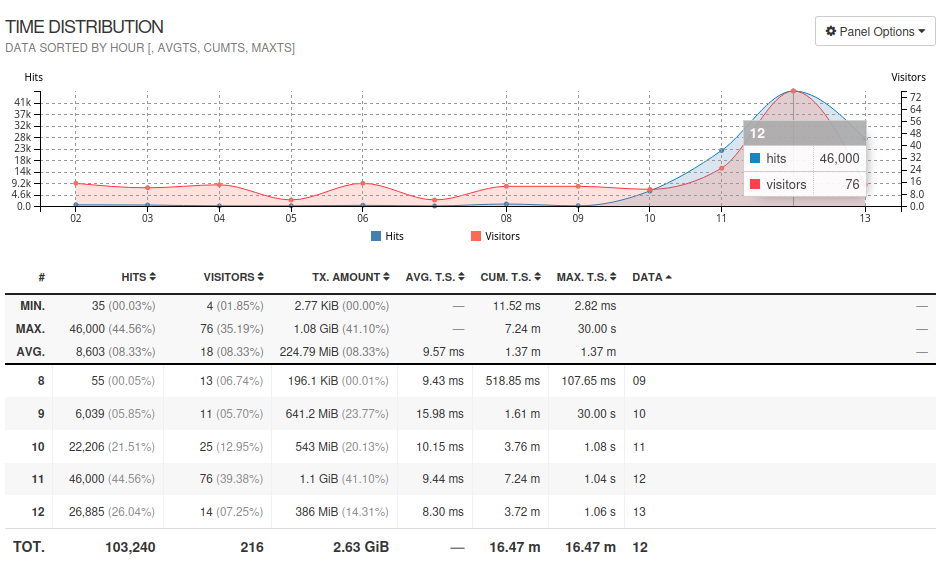
The requests have slowed down as the bots get their fill and give up, but I wonder if they'll be back for more. It's a good thing I don't believe in Roko's Basilisk, but I think some of the people working at these AI companies might - it would explain why they're so desperate to scrape the entire internet. Although these tarpits and static sites are easy to serve, this kind of load would definitely increase the cost of hosting, or completely knock over, a dynamic site or anything that hits a database on small server. Things like git and smaller social sites. I hope that for every worthless page I give them, that's one less request of load they can inflict on somebody else's site.